
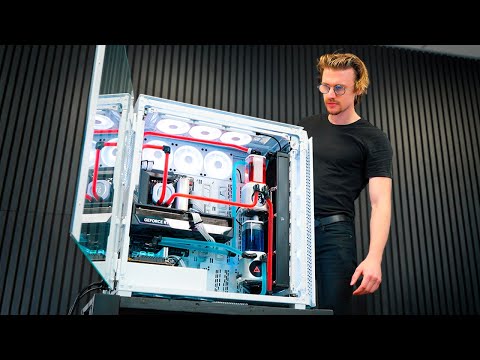
How To Build a Watercool Gaming PC! A full in-depth step by step guide to building a custom watercooling loop for your gaming PC! From unboxing all the parts to bending and installing tubing, setting up your pump and reservoir, filling the loop, leak-testing, and configuring your system for the best performance! I’ll walk you through every single stage of the process how to build a gaming pc and build your own watercooled PC!
SAVE 10% at Checkout with code ‘BENROW’
👉 Buy direct from Corsair here:
🇺🇸 USA Product Links:
Corsair 9000D PC Case –
Leak Tester Kit –
CORSAIR Hardline Bending Kit –
MAIN PC SPECS ⬇️
AMD 9800X3D CPU –
GIGABYTE X870E AM5 Motherboard –
GIGABYTE AORUS GeForce RTX 5090 GPU –
Corsair 32GB RAM –
Light Enhancement Kit –
CORSAIR MP700 ELITE Gen 5 Name SSD –
iCUE XC7 CPU Block LCD Screen:
Power Supply HX1500i –
SECOND PC SPECS ⬇️
Intel 285K Core Ultra 9 CPU –
GIGABYTE Z890I AORUS Motherboard –
Corsair 32GB RAM –
CORSAIR MP700 ELITE Gen 5 Name SSD –
XC7 CPU Block No Screen –
Power Supply SF750 Gen 5 –
WATERCOOLING LOOP ⬇️
CORSAIR Hydro X Series XF Hardline 90 Degree –
CORSAIR Hydro X Series XF Hardline Compression Fitting –
CORSAIR Hydro X Series XF Drain Valve –
XR7 Radiator 540mm –
XR5 Radiator 360mm –
14mm Hardline Tubing –
XD6 LCD Pump/Reservoir Combo –
🇬🇧 UK Product Links:
Corsair 9000D PC Case –
Leak Tester Kit –
CORSAIR Hardline Bending Kit –
MAIN PC SPECS ⬇️
AMD 9800X3D CPU –
GIGABYTE X870E AM5 Motherboard –
GIGABYTE AORUS GeForce RTX 5090 GPU –
Corsair 32GB RAM –
Light Enhancement Kit –
CORSAIR MP700 ELITE Gen 5 Name SSD –
iCUE XC7 CPU Block LCD Screen:
SECOND PC SPECS ⬇️
Intel 285K Core Ultra 9 CPU –
GIGABYTE Z890I AORUS Motherboard –
Corsair 32GB RAM –
CORSAIR MP700 ELITE Gen 5 Name SSD –
XC7 CPU Block No Screen –
WATERCOOLING LOOP ⬇️
CORSAIR Hydro X Series XF Hardline 90 Degree –
CORSAIR Hydro X Series XF Hardlin Compression Fitting –
CORSAIR Hydro X Series XF Drain Valve –
XR5 Radiator 360mm –
14mm Hardline Tubing –
XD6 LCD Pump/Reservoir Combo –
00:00 – How To Watercool Gaming PC!
00:20 – Choosing PC Case and Components (Corsair 9000D Super Tower)
02:38 – Motherboard Preparation and Install
07:34 – Power Supplies
09:46 – PC Radiators 101: Everything You Need To Know!
10:45 – PC Gaming Fans & iCUE Link Explained
12:34 – Planning Your Watercooling Loop
13:22 – How to Bend a Hardline Tube, Cut & Install
19:00 – Building a Watercooled Gaming PC
23:40 – Understanding Loop Order & System Flow
25:17 – How to fill your Watercooled Gaming PC with Coolant
28:40 – Installing Windows 11 onto Gaming PC!
Some of the links in this description are Affiliate Links, I get a small percentage from any sales made from clicking these links. It helps support my channel and making more content!
Thanks for watching!
RTX 5090 8K Gaming video dropping next week! Subscribe!
29:00 bros mouse wasn’t from Corsair ig
That case is comically large.
What if I don’t want microslop bindows
do a simple leak test, jesus christ.